
Reproducibility
Last updated on 2026-11-17 | Edit this page
Overview
Questions
- What does it mean for a workflow to be reproducible?
- What are the benefits of working reproducibly?
- Does reproducibility guarantee good research?
Objectives
- Explain what reproducibility is and how it fits alongside replicability, robustness, and generalisability.
- Describe the advantages of making your work reproducible and who benefits from those advantages.
- Be familiar with a set of best practices and tools (including version control, compute environment control, FAIR data, and clear documentation), that enable reproducible workflows.
A colleague’s R analysis
Before we work with real R code, let’s consider a hypothetical scenario.
Imagine a colleague has sent you their R script.
They ask you to reproduce their results while they are away.
You have the code. You know R.
It should be straightforward. Right?…
Why is the code not running?
You try to run an R script you received from a colleague. But it fails with and error or does not run at all.
Give three possible reasons.
These are some of the most common causes:
- Missing packages: The script may rely on packages that are not installed.
- Incorrect file paths: The script may use file paths that only exist on your colleague’s computer.
- Operating-system differences: An operating system, such as Windows, macOS or Linux, is the main software that manages your computer and runs programs such as R. We give an example in the How can the operating system matter? callout below.
- Documentation missing or unclear: If the script does not explain required inputs, expected file locations, or setup steps, you may not know how to run it correctly.
- Missing input: The script may expect other data files or inputs that were not shared with you.
If you are running the analysis on a different dataset, the script may fail because it expects specific column names, orders, or data types. This is actually a replicability issue rather than a reproducibility issue. We will cover that distinction later.
How can the operating system matter?
An operating system is the main software that manages your computer’s files, memory and hardware, and allows programs such as R to run. Windows, macOS and Linux are examples of operating systems.
The same R code can behave differently on different operating systems. So, your colleague’s script might run on their Linux computer but fail on your Windows computer because the two systems handle some tasks differently. The reverse can also happen.
For example, suppose a file in your working directory is called
Small-01.csv, but your code uses a lowercase
s:
R
read.csv("small-01.csv")
On your Windows computer, this code might work because filenames are usually matched regardless of capitalisation.
On your colleague’s Linux computer, it would usually fail because
small-01.csv does not match Small-01.csv.
Always match the filename exactly to avoid this problem:
R
read.csv("Small-01.csv")
What is reproducibility?
A workflow is reproducible when someone else can use the same data and same analysis to obtain the same results.
But having the code doesn’t guarantee this.
You also need the right data, software versions, and instructions.
Getting the script to run is only the first hurdle.
But what if it runs and the results are different?
Why did the results change?
Your colleague tells you which versions of packages to install and provides missing data files.
You run the script again and now it runs!
However… the results are different from your colleague’s.
Give three possible reasons for this reproducibility failure.
These are some of the most common causes:
-
Software version: R itself, or one or more packages
(e.g.
dplyrorggplot2), may be a different version on your machine than on your colleague’s. Even minor version updates can change default behaviour. - Data: The script may rely on a specific version of a dataset, but you might be using a different copy. Files may have been edited, rows removed, variables renamed, or missing values handled differently.
- Unclear documentation: If the workflow is poorly documented, you may unknowingly run steps differently — for example, using the wrong file, wrong parameters, or missing preprocessing steps.
- Manual steps that are not reproducible: If your colleague performed manual data cleaning, interactive filtering, or hand-edited files, those steps may not be captured in the script. As a result, your run will not match theirs.
-
Uncontrolled randomness: Many R functions use
randomness internally (e.g.
sample(), bootstrapping, cross-validation). If the script does not set a random seed usingset.seed(), each run can produce different results. Different machines may also use different random number generators or parallel backends, increasing variability. - Different computer setups: Windows, macOS and Linux can use different software to perform calculations, leading to small differences in results even with the same R code and package versions.
- Hidden state in the workspace: If the script is run in an R session that contains objects from previous work, those objects can interfere.
What makes a workflow reproducible?
So far, we’ve encountered two problems:
- The script did not run.
- The results did not match.
What could your colleague have done differently?
How can you increase reproducibility?
Name three tools or practices you can use to help others — and your future self — to reproduce your work.
Tools and Practices for Reproducibility
- Version control with Git captures the exact state of your project at any point in time. This ensures the code used for an analysis workflow is preserved and recoverable, even after changes have been made later.
-
Environment management with tools like
renvcapture software dependencies so others can recreate your computational environment. - Clear documentation including READMEs, comments, and usage instructions.
- Good data management practices like using consistent naming, metadata, and storing raw data separately from processed data.
- Publishing code, data, and notebooks in publicly accessible repositories increases transparency and allows others to easily access your work.
What about your future self?
Imagine returning to your own analysis a year later.
The code has changed. You’ve updated your packages.
Could you still reproduce your original results?
Reproducibility isn’t just about sharing research. It’s also about being able to return to it.
Why should research be reproducible?
Give three reasons to improve the reproducibility of the project.
Reproducibility is the essential first benchmark of trustworthy scientific research: without it, no further validation is possible.
Beyond the clear benefits for science, other reasons are:
- Helping your future self: A reproducible workflow saves time when revisiting or updating your project later. You avoid having to reconstruct your steps from memory.
- Collaboration: Transparent methods, shared code, use of established conventions, and clear documentation, all make it easier for others to understand, extend, and build on your work.
- Publishability: Journals and reviewers increasingly expect accessible data and transparent methods. Easily reproducible research is more credible and more likely to be accepted.
- Impact: Reproducible work is easier to reuse, cite, and adapt, increasing the reach and influence of your research.
Is reproducibility enough?
Back to our colleague’s analysis.
The script runs. The results match. Success!
But what if the original analysis contains a mistake?
We could reproduce that mistake too.
Reproducibility tells us whether we can obtain the same results, not whether those results are correct.
So, what else should we consider when assessing research?
Beyond reproducibility
Reproducibility is one way to assess research, but it is not the only one.
Explore The Turing Way’s guide to reproducibility.
Find out what replicability, robustness, and generalisability mean.
Then consider:
- How do replicability, robustness, and generalisability differ in terms of the data and analyses used?
- What does each help us assess about the research findings?
These concepts help us assess whether research findings hold under different conditions.
Replicability
Same analysis, different data.
Do we reach similar conclusions when we repeat the analysis using a new dataset?
Replicability helps us assess whether findings depend on the original data.
Robustness
Same data, different analysis.
Do we reach similar conclusions when we analyse the same data differently?
For example, we might use different statistical methods or preprocessing choices.
Robustness helps us assess whether findings depend on a particular analytical approach.
Generalisability
Different data, different analyses, or different conditions.
Do the findings hold beyond the original study?
Generalisability considers whether conclusions apply across the populations, settings, or conditions relevant to the research question.
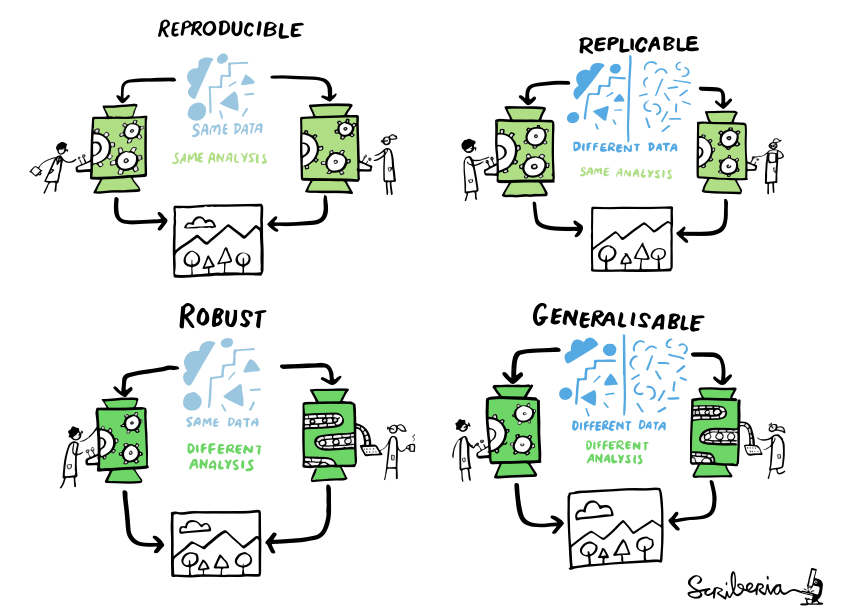
The Turing Way Community. This illustration is created by Scriberia with The Turing Way community, used under a CC-BY 4.0 licence. DOI: 10.5281/zenodo.3332807
Good practices
Our hypothetical scenario has shown us why reproducibility matters: without it, we cannot easily check or build on research results.
But reproducibility alone is not enough. We also need code that is easy to understand, test, maintain, and reuse.
That’s where good coding practices come in.
Together, these practices help us produce more reliable, transparent, and reusable research.
What’s next?
We’ve explored these challenges through a hypothetical scenario.
Now let’s see what happens with real R code.
In the next episode, Environments, we’ll work with
our colleague’s script, investigate why it fails, and learn how to
manage package dependencies using renv.
- Reproducibility: Same data and analysis, same results.
- Reproducible does not necessarily mean correct.
- Replicability, robustness, and generalisability help us assess findings beyond the original analysis.
- Good coding practices make research easier to check, maintain, and reuse.